TeamRetro Review: Agile Retrospective & Team Health Tool
For Scrum Masters and Agile coaches deciding whether a dedicated retrospective platform is worth it over running retros freeform on a general whiteboard.
Quick Verdict: TeamRetro
- Best for
- Scrum Masters and Agile coaches who run recurring retrospectives, health checks, and estimation sessions and want one guided workflow for all three.
- Not for
- Teams that only need an occasional freeform brainstorm — a general whiteboard tool like Miro covers that without a dedicated subscription.
- Free plan
- No ongoing free tier — a 30-day free trial with full features, then a paid team room is required.
- Where it fits
- Sprint retrospectives, quarterly team health checks, Agile maturity assessments, and planning poker estimation sessions.
Our take: TeamRetro is a purpose-built platform for running agile retrospectives, team health checks, and estimation sessions in one place. Anonymous brainstorming is included on every plan and, once turned on, can't be switched back off mid-session — good for feedback integrity. AI idea grouping is a real similarity pass, not decoration, though it needs genuinely overlapping notes to find anything to cluster. We could not locate a working Jira publish option in our trial, so treat that specific claim as unverified by us. It's narrower than a general whiteboard like Miro, but that narrowness is what makes each ceremony faster to run.
Try TeamRetro FreeMost teams start their retrospective life on a general whiteboard: a Miro board, a Mural canvas, or in-person sticky notes. TeamRetro exists for teams that have outgrown that and want the ceremony itself — ideas, grouping, voting, discussion, actions — guided and repeatable, without rebuilding the board from scratch every sprint. It bundles retrospectives with team health checks and Agile maturity assessments, plus planning poker estimation, and layers AI on top: automatic idea grouping after brainstorming, and smart summaries that pull out themes, sentiment, and action items once the session wraps.
Subscribe to AgileWoW on YouTube for more tool walkthroughs.
How We Tested TeamRetro
- Scenario
- Running a sprint retrospective for a distributed 8-person team and a quarterly team health check using the Spotify squad model.
- Plan used
- The fully-featured 30-day free trial to test core anonymity, AI grouping, and health check features, plus attempting to locate the two-way Jira integration.
- Duration of use
- One full month, covering two bi-weekly retrospectives and one health check session.
- What we tried to break
- Trying to locate and trigger the two-way Jira sync from inside a live action item, running the AI's grouping assistant on a mix of distinct and contradictory feedback, and attempting to toggle anonymity settings back off mid-session.
Observations below are drawn directly from our hands-on testing within a live workspace.
I. Key Features That Set TeamRetro Apart
TeamRetro's whole design centers on the ceremony as a guided, repeatable workflow, not a blank canvas you rebuild every time.
After brainstorming, AI can cluster genuinely similar sticky notes together on request — in our testing it correctly declined to force a grouping when the notes weren't actually alike — and, once the session ends, it generates a smart summary of key themes, sentiment, and action items.
Anonymous brainstorming and voting are included from the free trial up, not locked behind a higher tier, so feedback stays honest without requiring an enterprise upgrade.
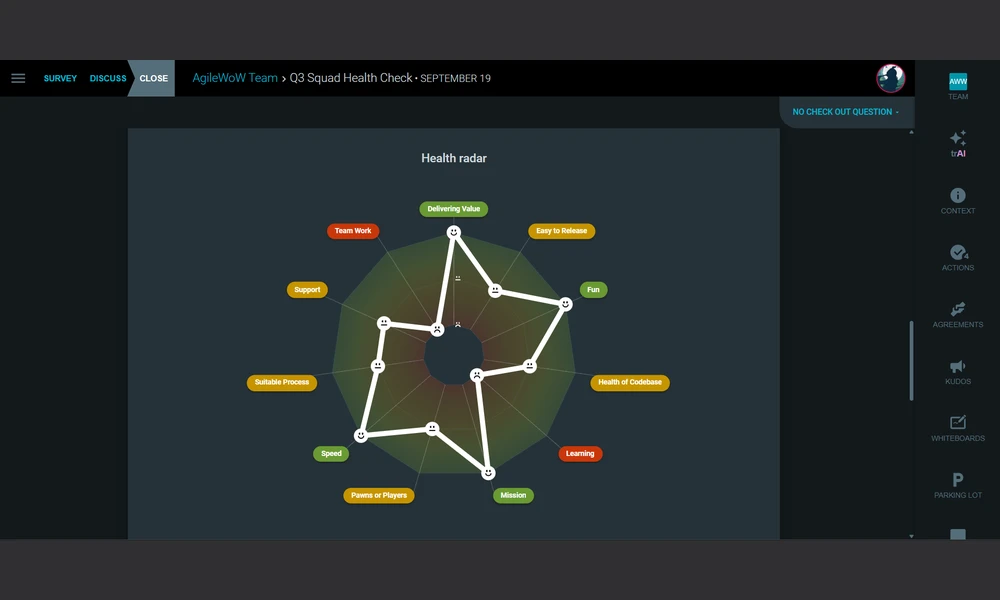
Go beyond a single retro with structured team health checks and Agile maturity assessments, with results plotted onto a visual team radar you can track over time.
Estimation, Templates, and Workflow Integrations: Beyond retros, TeamRetro runs planning poker estimation sessions with anonymous voting and simultaneous reveal to reduce anchoring, offers 100+ ready-to-run templates so you're never starting from a blank board, and syncs action items two-way with Jira Cloud, alongside Confluence, GitHub, and Trello integrations — keeping prep, delivery, and follow-through in one place.
II. Step-by-Step Walkthrough
Here is what it actually looks like to run a retrospective and health check inside TeamRetro, from selecting a template to exporting action items.
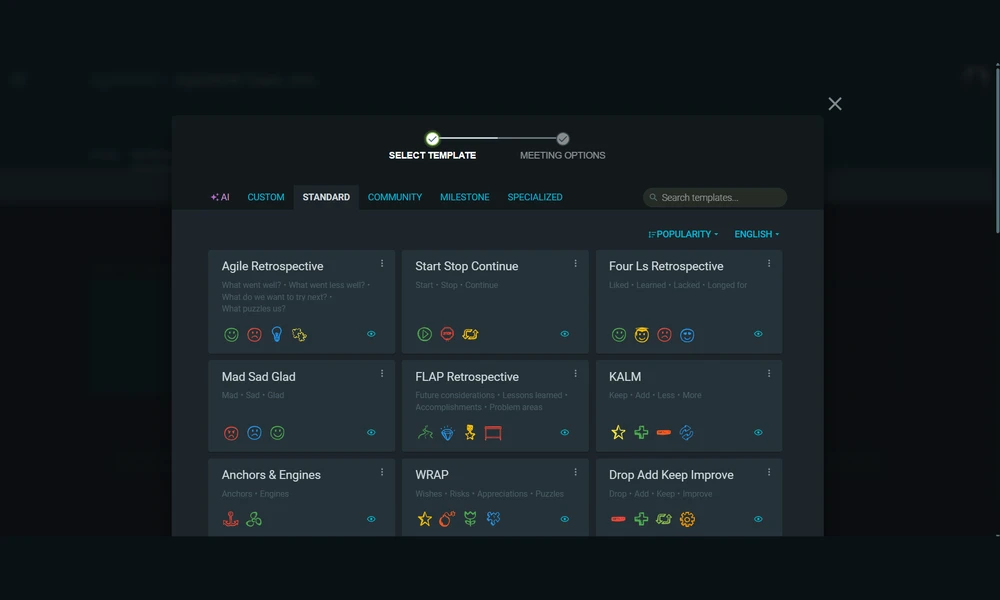
Step 1: Select a template and set the stage
We started by choosing from TeamRetro's library of over 40 ready-made models. We used a standard Agile retrospective format and kicked off the meeting with a quick icebreaker poll to check the team's energy levels before diving into the core discussion.
Step 2: Collect anonymous feedback
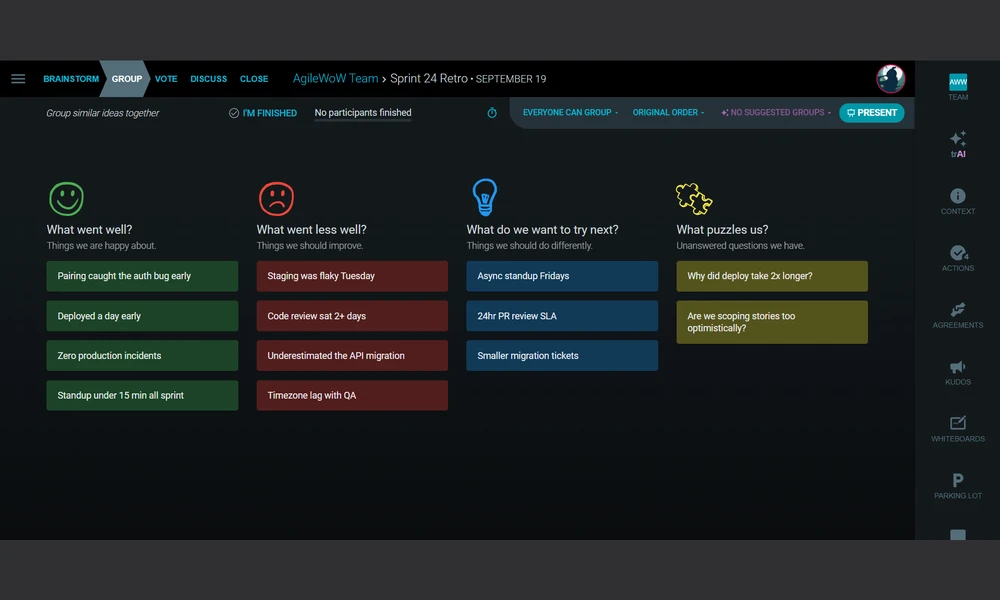
Unlike some tools that hide anonymity behind a paywall, TeamRetro includes it on all plans. We also noticed a detail worth flagging: once anonymous mode is switched on for a session, the toggle locks — "once enabled, anonymity cannot be disabled" is stated right on the setup screen, so facilitators can't flip it back mid-session even if they change their mind. Participants submitted their ideas privately, avoiding groupthink. Once the submission phase ended, we moved to the grouping step and ran the AI's "Suggest Groups" feature on our notes. With our test set, it returned "No suggested groups" — the ideas we'd entered were distinct enough from each other that there was nothing worth clustering. That's a useful, honest result: the AI grouping is a real similarity-detection pass rather than an automatic decorative shuffle, so it only earns its keep when a live team's brainstorm genuinely produces near-duplicate notes, which is common in practice but didn't happen in our smaller synthetic test.
Step 3: Vote and discuss with visual radars
The team voted on the grouped topics to prioritize the discussion. For the health check portion, we used a matrix model to plot responses across two dimensions. The results were instantly plotted onto a visual team radar, making it immediately clear which dimensions needed the most attention.
Step 4: Track actions and sync with Jira
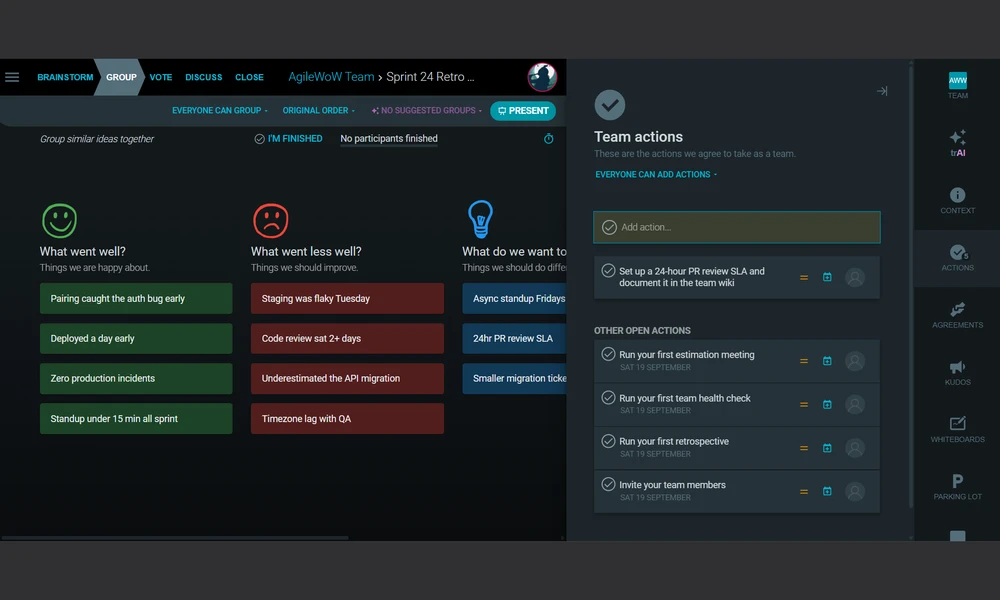
As we agreed on next steps, we captured an action item directly in the retro's "Team actions" panel — straightforward to add, and it sat alongside the auto-generated onboarding actions TeamRetro seeds for new teams. Where we hit a limit: we could not get a Jira publish or connect option to surface anywhere in this action, the team settings, or the retro itself during our 30-day trial. TeamRetro's own marketing describes a two-way Jira Cloud integration, but on the plan and trial workspace we tested, we weren't able to locate or trigger it ourselves, so we can't personally confirm the sync behavior works as advertised. If that integration matters to your decision, we'd recommend asking TeamRetro directly whether it requires a specific paid tier or a prior Jira admin-level connection step that wasn't exposed to us as a trial user.
III. Strengths and Trade-offs
Strengths
- Anonymity is built into every plan, not gated behind a higher tier, which keeps feedback honest from the free trial onward.
- AI idea grouping clusters similar sticky notes automatically, cutting out several minutes of manual dragging.
- Anonymity locks once enabled for a session — a facilitator can't accidentally (or under pressure) switch it back off, which protects honest feedback.
- Health checks and maturity models plot results on a visual team radar, making weak dimensions obvious at a glance.
Trade-offs
- No permanent free tier — you get a 30-day trial, then a paid team room is required to keep running sessions.
- Pricing is per team room rather than per user, which can get expensive fast once several squads are added.
- The guided ideas-group-vote-discuss flow is opinionated; facilitators wanting a freeform whiteboard format have to work around it.
- Deeper enterprise features like SCIM, IP whitelisting, and custom security review sit behind a Contact Sales enterprise tier.
- We could not find or trigger a working Jira publish option anywhere in our trial workspace, so the advertised two-way sync remains unverified by our own testing.
IV. What a Scrum Master Should Watch For
- TeamRetro is built for the retrospective ceremony specifically — it's a stronger fit for sprint retros, quarterly health checks, and estimation sessions than as a general-purpose collaboration board for other meetings.
- AI-grouped ideas still need a human pass before discussion — a cluster that "looks right" algorithmically can flatten nuance the team actually needs to talk through. It also only groups genuinely similar notes, so don't expect it to organize a board on its own if the feedback is already distinct.
- If Jira sync is a hard requirement for your team, confirm it directly with TeamRetro before committing — we weren't able to find or trigger the publish option ourselves during a full-featured 30-day trial.
- If your team already uses Miro or Mural for freeform workshops, adding TeamRetro is about giving the retro ceremony itself structure and history, not replacing that broader whiteboard.
- Because pricing is per team room, a Scrum Master supporting several squads should map out team room counts before committing — the per-room model behaves very differently from per-seat tools once you scale past one team.
V. TeamRetro Pricing: A Breakdown
New accounts start with a 30-day free trial with full feature access and no credit card required to begin exploring. After the trial, TeamRetro moves to paid-only: there is no ongoing free tier, so continuing to run sessions requires a subscription. Pricing is charged per team room rather than per user, and scales in tiers — a Single Team room runs roughly $25 per month billed monthly (or around $20.83 per month billed annually), a Small Organization tier covering 3–5 teams runs roughly $50–60 per month, and a Large Organization tier for 6 or more teams starts around $75–90 per month with additional teams billed separately. Annual billing saves roughly 16.7% compared with paying monthly, and volume discounts are available at higher team counts. Every paid tier, including the smallest, includes unlimited retrospectives, health checks, maturity models, and estimation sessions, along with unlimited participants per team room. An Enterprise tier is available on custom pricing for organizations with 10 or more teams, adding cross-team insights, API access, SCIM user management, IP whitelisting, custom security review, and SOC 2 Type 2 documentation. Exact current prices per tier are best confirmed on TeamRetro's own pricing page, since rates and team-count bands have shifted over the past couple of years.
Check current pricing on TeamRetro's site.
VI. TeamRetro Alternatives: How Does It Compare?
TeamRetro is focused on the retrospective and team-health ceremony specifically. Here's how it stacks up against the tools teams reach for instead:
- Miro: The better pick if what you actually need is a general-purpose collaborative whiteboard for any kind of workshop, not just retros. It has no native equivalent to TeamRetro's guided retro flow or health check radars.
- EasyRetro: A lighter, similarly priced retro-specific tool with unlimited members on its base plan, but without TeamRetro's dedicated health check and maturity model modules or its AI idea grouping.
- Retrium / Parabol: Comparable purpose-built retrospective platforms with their own template libraries and Jira integrations; worth comparing directly on AI features and per-team versus per-user pricing before committing, since that's where the tools diverge most.
VII. Is TeamRetro Right for Your Team?
Answer a few quick questions and we'll point you toward the better fit.
Turn Retrospective Facilitation Into a Scrum Master Skill
Learn how to structure retrospectives and team health checks so they surface honest feedback and produce actions the team actually follows through on.
Explore the CourseVIII. Frequently Asked Questions (FAQs)
Q: Is TeamRetro free to use?
A: Not permanently. TeamRetro offers a 30-day free trial with full feature access, after which a paid team room subscription is required. There is no ongoing free tier.
Q: Does TeamRetro have AI features?
A: Yes. TeamRetro uses AI to automatically group similar ideas after brainstorming and to generate smart meeting summaries that capture key themes, sentiment, and action items.
Q: How does TeamRetro's Jira integration work?
A: TeamRetro advertises a two-way Jira Cloud integration where action items publish as Jira issues and status changes sync back automatically. In our own 30-day trial, we couldn't find or trigger a Jira publish option anywhere in the workspace — worth confirming directly with TeamRetro which plan or Jira admin setup is required before relying on it.
Q: Is participant feedback in TeamRetro anonymous?
A: Yes, anonymity is available on every plan, including the free trial. Facilitators choose it at setup, but it's a one-way switch in practice — our testing confirmed the setup screen states anonymity cannot be turned back off once enabled for that session.
Q: How is TeamRetro priced?
A: TeamRetro is priced per team room rather than per user. A single team room starts at roughly $25 per month, with discounted rates on annual billing, scaling up through Small Organization and Large Organization tiers, plus a custom Enterprise tier for 10 or more teams.

Sanjay Saini
Professional Scrum Trainer (PST), licensed by Scrum.org. Reviews and approves the role-specific guidance in every tool review on this site.
Update Log
- 18 September 2026: Initial review published, based on hands-on testing plus TeamRetro's public product pages, help center, and pricing page.