SessionLab Review: Workshop Agenda Planner
For Scrum Masters, Agile coaches, and trainers deciding whether a dedicated workshop-agenda tool is worth it over a spreadsheet or a Miro board.
Quick Verdict: SessionLab
- Best for
- Facilitators, trainers, and Agile coaches who design multi-activity workshops and need timing to add up automatically.
- Not for
- Teams who just need a shared whiteboard for a single retro — a free Miro or Mural board covers that without a new tool.
- Free plan
- Yes, no time limit, but capped at 3 saved sessions and no collaboration features.
- Where it fits
- Sprint planning workshops, training courses, offsites, and any recurring session design work.
Our take: SessionLab is the most purpose-built tool on the market for designing the agenda itself — drag-and-drop blocks, automatic timing, a library of 1,000+ facilitation methods, and an AI assistant that can turn a brief into a draft agenda. It isn't a collaborative whiteboard, so pair it with Miro if you also need a live shared surface for the session itself.
Try SessionLab FreeMost people plan a workshop agenda the same way: a spreadsheet, or slots dragged around a Miro board that was never built for timing math. SessionLab exists specifically to fix that. It's a dedicated session-design tool — you build an agenda from blocks (activities, breaks, discussions), the running time recalculates as you move things around, and you can pull from a public library of over 1,000 facilitation methods instead of starting blank. In 2025 and 2026 SessionLab leaned hard into AI, adding an assistant that can turn a written brief or an uploaded file into a first-draft agenda, and that can make targeted, context-aware edits to an existing session on request.
Subscribe to AgileWoW on YouTube for more tool walkthroughs.
How We Tested SessionLab
- Scenario
- Designing a 3-hour PI Planning kickoff and a separate 90-minute cross-functional Retrospective.
- Plan used
- The 15-day free trial of the Pro plan, transitioning to the Free plan afterward to test session limits and feature lock-outs.
- Duration of use
- Two weeks of active session design and iteration.
- What we tried to break
- Feeding the AI Assistant an intentionally vague brief, shifting the start time of the entire workshop at the last minute to test automatic recalculation, and locking specific break times to force scheduling conflicts.
Observations below are drawn directly from our hands-on testing within a standard workspace.
I. Key Features That Set SessionLab Apart
SessionLab's whole design centers on the agenda as a living document, not a static export.
Turn a written brief, prompt, or uploaded file into a first-draft agenda with timing and activities, then ask the assistant to adjust tone, add missing instructions, or translate the plan without leaving the session.
Build sessions from blocks that recalculate timing automatically as you reorder them, eliminating the manual math that spreadsheets require every time a slot shifts.
A public library of 1,000+ activities and ready-made templates gives you a starting point instead of a blank page, searchable by goal, group size, or duration.
Briefs, Pages, and Feedback: Beyond the agenda itself, SessionLab lets you attach a brief with objectives and logistics, generate client-facing printouts, and collect post-session feedback — keeping prep, delivery, and follow-up in one place rather than scattered across documents and email threads.
II. Step-by-Step Walkthrough
Here is what it actually looks like to build a workshop agenda inside SessionLab, moving from a blank page to a client-ready export.
Step 1: Generate a first draft with the AI Assistant
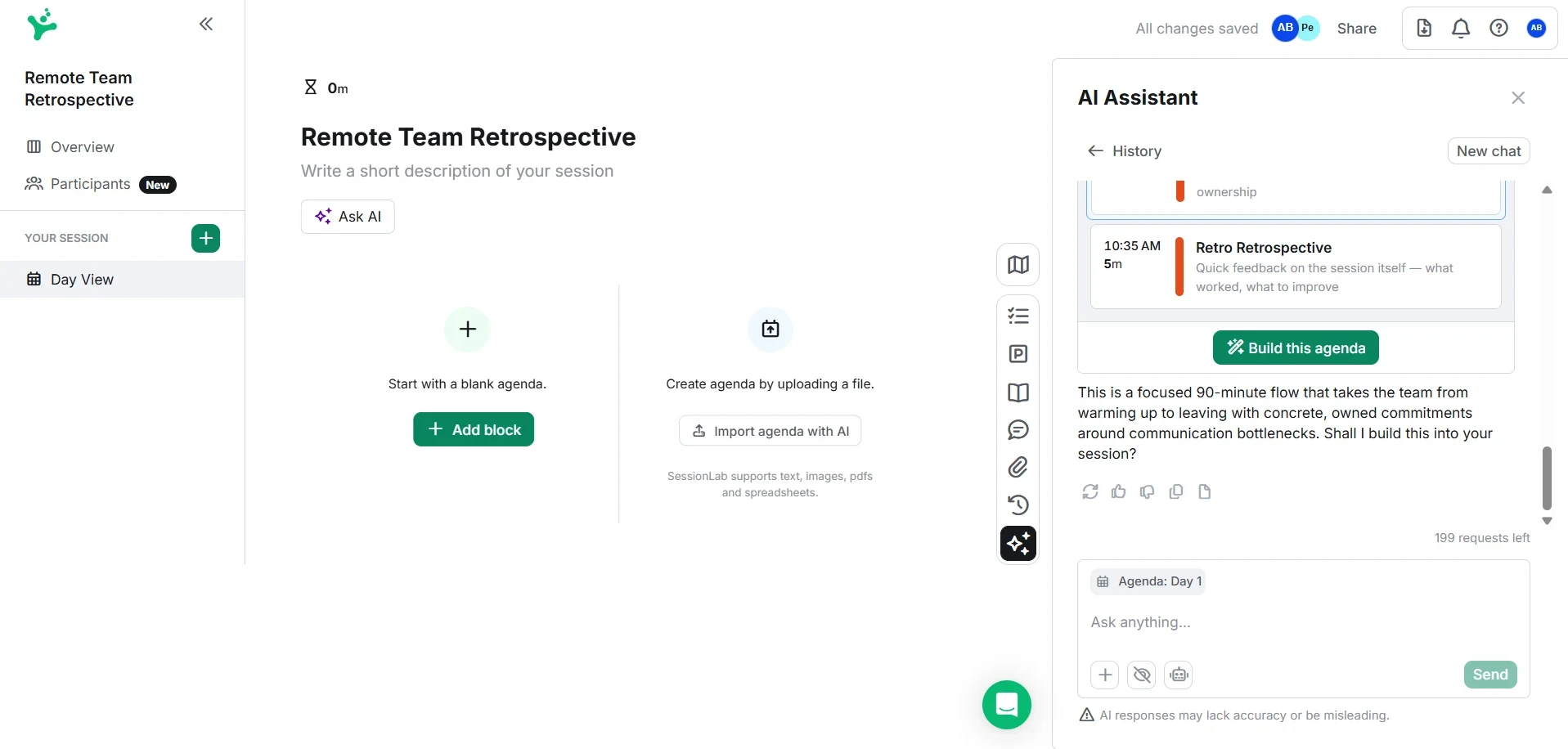
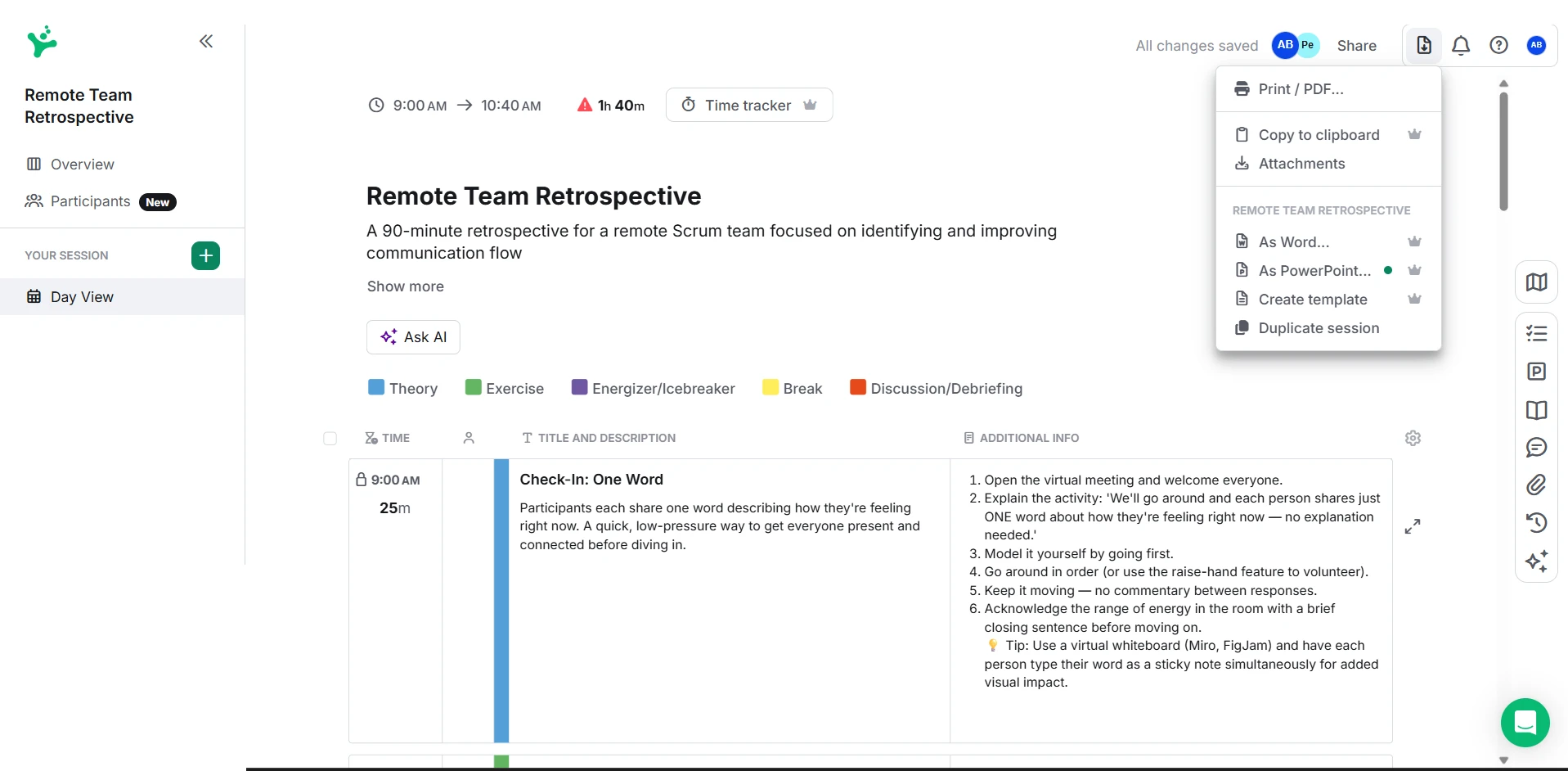
Instead of staring at a blank screen, we fed SessionLab's AI Assistant a simple prompt: "Create a 90-minute retrospective for a remote Scrum team focusing on communication bottlenecks." Within seconds, it generated a structured agenda complete with an icebreaker, main activity, and wrap-up, accurately assigning realistic timeboxes to each block.
Step 2: Drag, drop, and lock timings
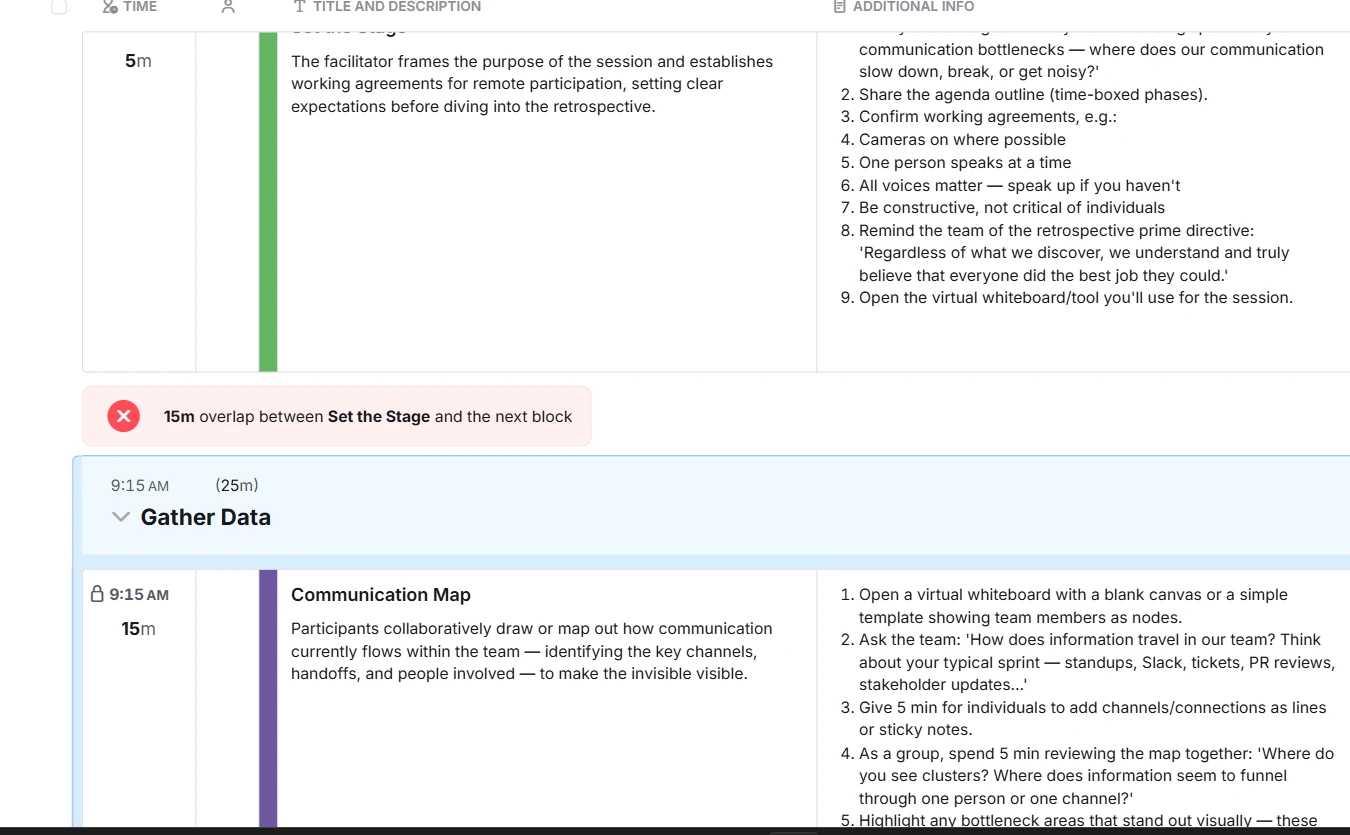
The standout feature is the automatic time calculation. When we decided to extend our main brainstorming activity by 15 minutes, SessionLab instantly updated the start and end times of every subsequent block. We also used the "lock time" feature to pin our lunch break exactly at 12:00 PM; when we added too many morning activities, the tool immediately flagged the timing overlap.
Step 3: Swap activities using the Method Library
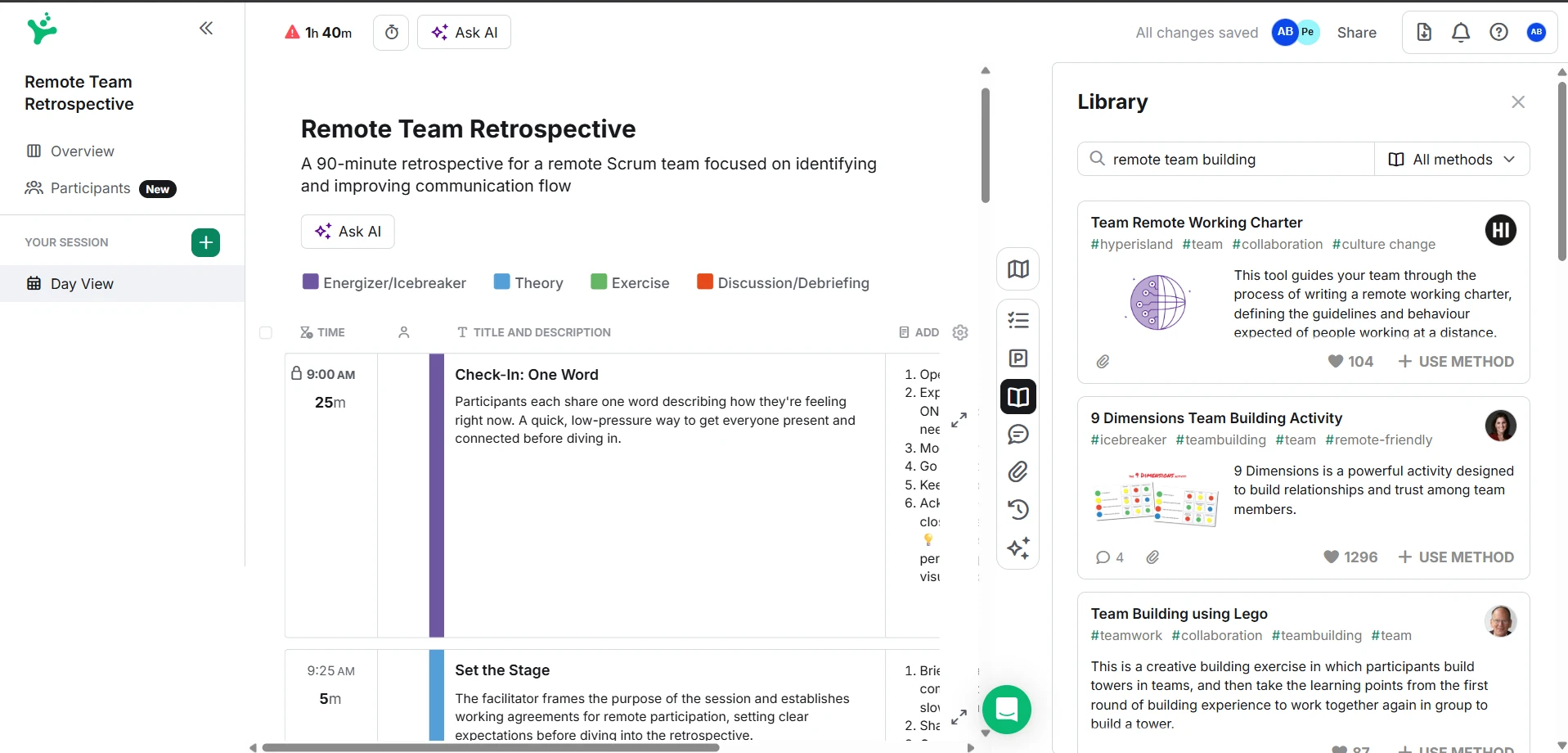
We opted to swap out the AI's generic icebreaker by opening the built-in Public Library. Searching for "remote team building" yielded hundreds of results. We found a suitable 10-minute activity and dragged it directly into our agenda, replacing the old block seamlessly.
Step 4: Color-code and export the final plan
To ensure a balanced flow, we applied custom color-coded categories to our blocks (e.g., blue for presentation, green for interactive exercises). The visual overview made it obvious when we had too much consecutive presentation time. Once adjusted, we exported a clean, customized PDF agenda to share with stakeholders.
III. Strengths and Trade-offs
Strengths
- Automatic timing math: the running duration updates instantly as you rearrange, add, or trim blocks.
- Large, searchable method library that removes the blank-page problem when designing a new session.
- AI Assistant can produce a usable first-draft agenda from a brief in minutes rather than starting from scratch.
- Free plan has no time limit, so solo facilitators can trial it indefinitely before committing.
Trade-offs
- Not a whiteboard: there's no live collaborative canvas for participants during the session itself, unlike Miro or Mural.
- Free plan caps you at 3 saved sessions and drops all collaboration features.
- Account required from the start — there's no anonymous, no-signup quick-plan mode.
- Paid seats are only required for members who create and own sessions; understanding who needs a seat versus who's just a collaborator takes a moment to work out from the pricing page.
IV. What a Scrum Master Should Watch For
- SessionLab is built for facilitated workshops with mixed activities — it's a better fit for a Sprint Review with external stakeholders, a training session, or a PI-planning day than for a routine daily stand-up.
- An AI-drafted agenda still needs a human pass for psychological safety and pacing — a generated timebox that "looks right" on paper may not match how your specific team actually works together.
- If your team already runs retros and reviews inside Miro or Mural for the interactive canvas, adding SessionLab on top is about agenda design and timing, not a replacement for that collaborative surface.
- The free plan's 3-session cap means you'll hit a wall fast if you're the Scrum Master designing sessions for multiple teams — budget for at least the Pro tier if this becomes a recurring part of your role.
V. SessionLab Pricing: A Breakdown
New accounts start with a 15-day free trial of the Pro plan, so you can explore the full feature set before deciding, and if you choose a paid plan you're covered by a 30-day money-back guarantee. No credit card is required to sign up, and if you don't upgrade your account switches automatically to the Free plan, keeping access to your existing sessions up to a cap of 3, the Session Planner, and the Public Library. SessionLab offers both monthly and annual billing, with annual billing saving roughly 35% compared with paying monthly. The free plan's main limitations versus paid tiers are a maximum of 3 sessions and no collaboration options. On the Business plan, each workspace member can create and share sessions and gets access to all Pro-tier features, with invoice billing available for workspaces of 5 or more seats. Only workspace members who create and own sessions need a paid seat — collaborators who just edit, comment, or view can be added without one. Exact current prices per tier are best confirmed on SessionLab's own pricing page, since plan names and rates have shifted over the past couple of years.
Check current pricing on SessionLab's site.
VI. SessionLab Alternatives: How Does It Compare?
SessionLab is focused on agenda design specifically. Here's how it stacks up against the tools teams reach for instead:
- Miro: The better pick if what you actually need is a live collaborative whiteboard for the workshop itself — sticky notes, voting, real-time co-creation during the session. It has no native equivalent to SessionLab's automatic agenda timing.
- Spreadsheets / Google Sheets: Free and familiar, but every timing change is manual, and there's no method library or AI drafting. Fine for a single simple agenda, painful as a repeated workflow.
- Mural: Similar positioning to Miro — a strong whiteboard for facilitation exercises themselves, but not built around agenda timing or a reusable method library the way SessionLab is.
VII. Is SessionLab Right for Your Team?
Answer a few quick questions and we'll point you toward the better fit.
Turn Workshop Design Into a Scrum Master Skill
Learn how to structure and time-box facilitated sessions so your ceremonies stay engaging without losing the human judgment good facilitation depends on.
Explore the CourseVIII. Frequently Asked Questions (FAQs)
Q: Is SessionLab free to use?
A: Yes. The Free plan has no time limit and includes the Session Planner and Public Library, but it caps you at 3 saved sessions and has no collaboration features.
Q: Does SessionLab have an AI assistant?
A: Yes. It can turn a written brief, prompt, or uploaded file into a draft agenda with timing and activities, and can make context-aware edits to an existing session — for example adding instructions to blocks that are missing them, or adapting activities for a specific audience.
Q: How does SessionLab compare to Miro for workshop planning?
A: Miro is stronger as an open whiteboard for real-time collaborative brainstorming during a session. SessionLab is purpose-built for the agenda itself, automatically calculating timing block-by-block, which Miro has no native equivalent for. Many facilitators use SessionLab to plan and Miro to run the session.
Q: Does SessionLab require a credit card to start?
A: No. You can sign up and start using SessionLab immediately without a credit card. New accounts start with a 15-day free trial of the Pro plan before switching to the Free plan automatically if you don't upgrade.
Q: Who needs a paid seat on a SessionLab team plan?
A: Only workspace members who create and own sessions need a paid seat. Collaborators who just edit, comment, or view alongside you don't require one.

Sanjay Saini
Professional Scrum Trainer (PST), licensed by Scrum.org. Reviews and approves the role-specific guidance in every tool review on this site.
Update Log
- 17 September 2026: Restructured the page to our current review template — added Step-by-Step Walkthrough and Update Log sections, and added Sanjay Saini as reviewer.
- 17 September 2026: Initial review published, based on SessionLab's public product pages, help center, and pricing page.